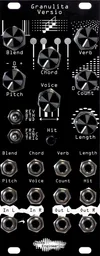
Last week, we introduced Granulita Versio, our granular chord resynthesizer. If you want to learn more about what it can do, you can check out the introduction blog to get familiar with what it can do.
If you’ve already ordered your limited-edition hardware, or swapped the firmware onto a Versio with the firmware app, we’ll be exploring three fun patches to try out while you’re getting to know the module. The video below shows off these three patches with timestamps for each, so you can hear what each patch can do!
Paraphonic chord oscillator
One of my favorite uses for Granulita Versio is as an add-on for a single oscillator in a subtractive patch.
Plug a simple saw wave into the Granulita input, then patch the outputs to a filter, then a VCA. Modulate your VCA and filter with envelopes, and you have a cool subtractive chord voice.
I like to set Granulita’s parameters as illustrated to start. The high Count and moderate Length settings create a smooth atmosphere, and the Pitch and Voice settings make it easy to track our external oscillator’s frequency. Pick a Chord setting to suit your patch, or modulate it with CV to change up the harmonies from a sequencer.

Arpeggiator
This one’s even simpler than the previous: patch in an oscillator to the audio input, and a clock signal or trigger sequence to the Hit input. Set the parameters as below, and change Chord to play different arpeggiated chords.

Setting Blend to maximum makes the grains act as a full voice, even though we have a constant tone at the input. The Trig mode plays grains only when a trigger is received at the Hit input, so the rate of the arpeggio can be modified by changing the rate of the clock at the input. Length can be adjusted to suit the speed of the arpeggio and the desired dynamics, and Verb adds some atmosphere to round out the patch.
Drum Deconstruction
While Granulita Versio’s design makes it a fantastic tool for melodic patching, it also excels at more abstract tasks like processing drums to create unique and grainy textures. Try patching a drum loop from a sample or drum voices in your system to the input of Granulita Versio, and start with the settings below to create a rhythmic layer, grainy layer on top of the input audio.

The short Length and high Count settings create a less impactful but more distinct texture, and the high Pitch transposition shifts the resulting grains out of the way of the input. Use Blend to balance between the input loop and granular output, and dial in Verb to round out the atmosphere.
What’re you patching?
If you’ve got a cool Granulita patch, we’d love to hear it! Drop us a line if you have a jam you want us to hear, or tag us on social media to share your patches with the whole community.