If you’ve been looking for a trigger generator for your system, this is the day you’ve been waiting for. Meet Multi Repetitor, an algorithmic pattern creator that takes inspiration from our classic Zularic and Numeric Repetitor modules and brings them into the modern era. In this post, we’ll explore its interface, what it can do, and how it can fit into your system. In the next few weeks, we’ll explore some fun ways to patch Multi Repetitor, and fill you in on a bit about its design process.

What is Multi Repetitor?
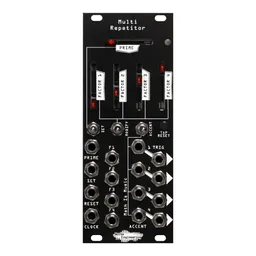
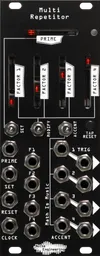
Multi Repetitor is a rhythm generator with four pattern outputs. From the start, we designed it to be incredibly simple to use, with enough depth to make it really fun to patch and explore. The core concept is simple: pick a base rhythm set, then modify it with different algorithms. Patch the four trigger outputs to drum voices, tap in a tempo, and you’re off!
Things get even more fun with the Accent outputs. These output gates that correspond to the trigger patterns using different algorithms to bring your drums to life. Patch them into dedicated accent inputs on your drum voices, or use them as CV sources to modulate any destination you’d like.
The great thing about Multi Repetitor is that, at this point, you can tweak things by ear and ignore what’s going on under the hood, if you wish – it’s that easy to use. However, if you want to get a little deeper, we can explore what’s actually going on to give you full control of your patch.
Prime, Factor, and the algorithms
The Prime fader and Set switch select the base rhythm set for the four outputs. On the left, you have the rhythms from Numeric Repetitor. In the center, Zularic Repetitor. And on the right, you have an entirely new rhythm bank based on Euclidean patterns. If you want to have a closer look, you can find an illustration of the core rhythms in the manual.
Each of these rhythm banks has a huge number of base rhythms to choose from, which is where Prime comes in. By moving the fader, you select a different base rhythm on the fly. This makes it simple to dial in something you like, quickly change up a pattern in a jam, or mix things up with CV – both Prime and Set, as well as the other faders, have CV inputs.
The next layer of modification comes from the Factor faders. These modify their respective outputs only based on the algorithm selected with Modify.
In the left position, the faders offset their rhythms in time – if you want your high hats, for example, to trigger an eighth note later, you can do that with the fader in this mode. (This is how Zularic Repetitor’s Child parameters modified their respective outputs.)
In the middle position, the Factor fader multiplies the Prime rhythm to create a different pattern. (And wouldn’t you know it, this is how Numeric Repetitor’s Factor parameters work.)
Finally, the right position picks a different rhythm in the rhythm bank for only that output – similar to Prime, but with individual control for each channel.
Add some spice
Accent signals are a simple and incredibly effective way to make sure your drum grooves stay dynamic and interesting. The accent switch is half a performance tool and half a mode select: in the left position, the accent outs are muted.
In the middle and right positions, things get interesting. Accent patterns are based on the next (middle position) or previous (right position) channel’s behavior. To derive an accent, Multi Repetitor computes both the unmodified (that is, the Factor parameters are ignored) and modified (Factors taken into account) patterns for all channels, and compares them each time a beat occurs. If either pattern would create a beat at the same time as the next/previous lane, the accent state is flipped.
This sounds really complicated, and it is, but the result is some really cool accent patterns that will play predictably, and also respond just enough to pattern modification to stay interesting.
Stand alone or patch with friends
Multi Repetitor can be clocked internally or externally. If you want to jam solo, Multi Repetitor has a tap-tempo clock that can run on its own. Hit the button a few times and you’re in the groove.
However, if you want to use Multi Repetitor with some other clocked modules in your system, it has standard clock and reset inputs that will respond nicely to whatever sort of trigger signal you throw at it. Swung clocks? Random triggers? Other trigger sequencers? No problem! And when there’s an external clock, you can use the button to manually reset the sequence for an extra layer of performance.
Put it in reverse
One thing that’s been front of mind for us recently is that optimal jack positioning really depends on the position of a module in a case. Maybe your sequencing is on the top row, with your voices below… or maybe it’s the opposite. So, we decided to make the interface of Multi Repetitor reversible. If you’d like to use the module in a faders-down configuration, just follow the flip instructions in the manual and patch accordingly!
Get your Repetitor
Multi Repetitor is shipping now. If you’d like to get your hands on one, head over to your favorite local retailer or order one from the Noise Engineering webshop.